

If you have ever felt a dull ache in your lower back after sitting for just 30 minutes, you are not alone. Millions of people suffer from preventable back pain caused by poor sitting posture, and a lumbar support pillow can be a game-changer when used correctly. This simple tool helps maintain your spine’s natural curve, reduces pressure on spinal discs, and prevents long-term strain. However, placing it incorrectly can make pain worse. This guide shows you exactly how to use a lumbar support pillow in any chair, using proven ergonomic principles and step-by-step adjustments.
You will learn where to place the pillow, how firm it should be, and why pairing it with movement is essential for lasting relief. The process starts with understanding your anatomy and preparing your seating foundation before adding any support.
Prepare Your Sitting Foundation
Before adding lumbar support, you must fix your base posture. A pillow cannot compensate for a poorly adjusted chair. Taking time to set up your seating correctly first ensures the pillow works with your body rather than against it.
Adjust Chair Height Correctly
Set your chair so your feet rest flat on the floor with knees bent at 90 degrees. Your thighs should run parallel to the ground. If your feet dangle, use a footrest or stack folded towels underneath. This alignment keeps your pelvis stable and prevents slouching. Proper height is the foundation upon which all other adjustments depend.
Optimize Seat Depth
Sit all the way back into the chair. There should be 2 to 3 finger-widths between the edge of the seat and the back of your knees. Too much depth compresses nerves and blood vessels behind the knees. Too little fails to support your thighs properly. If your chair allows, shorten the seat pan. Otherwise, shift forward slightly and add lumbar support only after your hips are fully seated against the backrest.
Fix Seat Pan Tilt
Avoid seats that tilt downward, raising your knees above hip level. This position rolls your pelvis backward and flattens your spine. A slight forward tilt of 0 to 5 degrees helps maintain the lumbar curve. If your chair does not adjust, place a rolled towel under the front edge to elevate your hips slightly. This small change makes a significant difference in maintaining proper spinal alignment.
Locate Your Natural Lumbar Curve
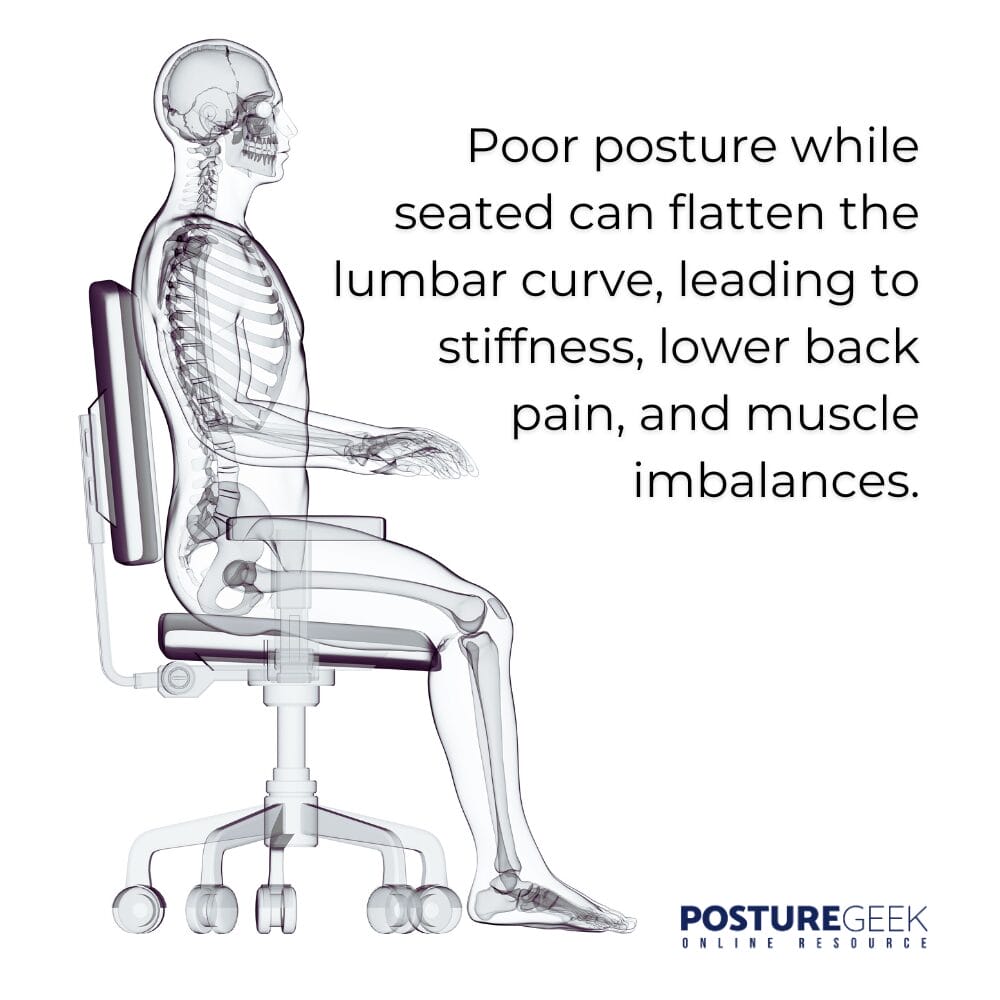
Correct placement starts with knowing your anatomy, not guessing. Understanding where your lumbar curve sits helps you position the pillow precisely for maximum benefit.
Find the Curve While Sitting
Sit upright and slide one hand behind your lower back. Feel for the inward dip just above your belt line. That is your lumbar lordosis, the spot the pillow must support. Do not confuse this spot with the bony hips or tailbone, which are located lower and serve different anatomical functions.
Use the Iliac Crest as a Landmark
Stand and locate the top of your hip bones, known as the iliac crests. Move two finger-widths upward from this point. That location marks the center of your lumbar curve. When you sit, align the fullest part of the pillow with this exact spot. This trick ensures consistent positioning across different chairs and vehicles.
Pro Tip: Mark this spot once with a washable pen to train your muscle memory for future reference.
Position the Pillow Accurately
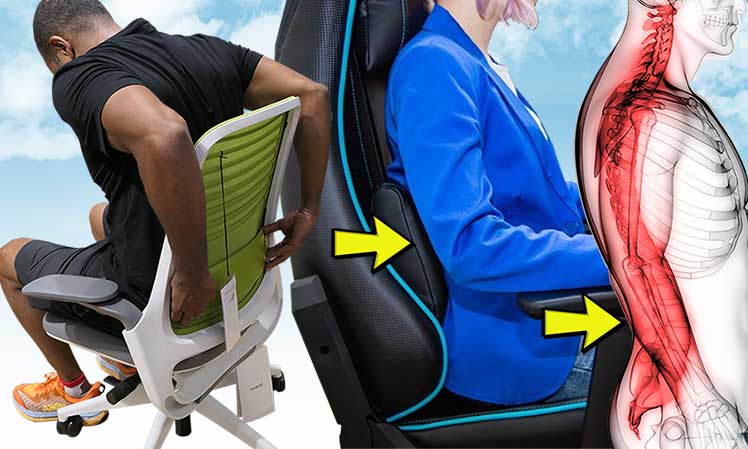
Placement determines whether the pillow helps or harms your back. Getting this step right is the most critical part of using lumbar support effectively.
Center It on Your Lower Back
Place the lumbar pillow directly into the gap between your lower back and the chair. The bulkiest part should press gently into your natural curve, not above it or below it. It should feel like a soft cradle, not a shove. The goal is to fill the space without forcing your spine into an unnatural position.
Avoid Common Placement Mistakes
The pillow causes problems when positioned incorrectly. Watch out for these three common errors.
Too high placement in the mid-back pushes your rib cage forward and strains your upper spine. Too low placement on the sacrum forces your lower back to round forward, increasing disc pressure. Placing it too far forward creates an exaggerated arch, also called hyperlordosis, which fatigues your muscles quickly.
Visual Cue: If you feel pressure under your ribs or tailbone, reposition the pillow upward or downward until the pressure disappears.
Adjust Depth and Firmness

Support should match your body, not fight against it. Finding the right balance takes a bit of experimentation but pays off in lasting comfort.
Set the Right Depth
The pillow should extend 2 to 4 centimeters into your back. Start shallow. If your spine still feels unsupported, increase depth gradually. Larger frames may need more depth, while petite users should go lighter. The goal is to fill the gap without forcing a curve. Think of it as gentle encouragement rather than aggressive correction.
Choose the Correct Firmness
Pick a pillow with medium firmness. It should conform slightly to your shape while resisting collapsing under pressure. Avoid materials that dig in or create hot spots. Memory foam and inflatable supports offer the best balance for most users. Avoid rock-hard rolls because they cause discomfort and lead to muscle guarding.
Myth Alert: Harder support does not work better. Excessive firmness leads to hyperlordosis and muscle fatigue. Support is about stability, not stiffness.
Integrate With Full Ergonomics
Lumbar support is just one piece of the puzzle. For the best results, combine it with proper workstation setup and healthy sitting habits.
Align Armrests Properly
Adjust armrests so your shoulders stay relaxed and elbows bend at 90 degrees. If armrests are too high, they hike your shoulders. Too low, and you lean sideways. Ideally, arms should rest lightly without bearing weight on them. Proper armrest alignment prevents secondary pain patterns from developing.
Position Your Monitor
The top third of your screen should be at or slightly below eye level. Sit about an arm length away, roughly 20 to 30 inches. This positioning prevents forward head tilt, which pulls your torso away from the backrest and defeats lumbar support. Monitor position directly affects how effectively your lumbar pillow works.
Keep Keyboard and Mouse Close
Place input devices within easy reach. Your elbows should stay close to your body with wrists neutral. Overreaching shifts your spine off-center and reduces the pillow effectiveness. Keep frequently used items within comfortable arm span to maintain proper posture throughout the day.
OSHA Rule: All workstation elements should support a neutral posture with the spine tall, neck centered, and limbs relaxed.
Use in Different Seating Environments
Lumbar support is not just for office chairs. You can use it effectively in cars, sofas, and dining chairs with the right approach.
Office Chairs
Even high-end chairs often have poorly placed built-in supports. If yours does not match your curve, add a dedicated pillow. Sit fully into the chair first, then insert the pillow. Use straps to secure it if it slips during use. A lumbar pillow becomes unnecessary only if your chair’s adjustable mechanism fits your spine perfectly.
Car Seats
Long drives strain the lower back significantly. Place the pillow before you start driving. Secure it with seatbelt loops or non-slip backing. Align it with your iliac crest landmark. Avoid sliding it behind your hips because it will not help in that position. Car seats often lack adjustable lumbar support, making a portable pillow especially valuable.
Sofas and Dining Chairs
Most home seating lacks ergonomic support. Bring a portable lumbar pillow for meals or TV time. Only use it if you can sit with your back fully against the backrest. If the chair is too shallow, the pillow may push you forward instead of supporting your curve. Test each seating environment and adjust accordingly.
Troubleshoot Common Problems
Discomfort means something is off. Here is how to fix the most frequent issues users encounter.
Lower Back Pain Increases
This issue usually stems from pillow depth being too aggressive or the seat pan tilting downward. Reduce the protrusion depth. Elevate your hips slightly with a towel to tilt your pelvis forward into a better position.
Legs Feel Numb or Tingling
This symptom indicates the seat is too deep and pressing behind your knees. Adjust seat depth to allow 2 to 3 finger-widths of space. Do not let the pillow shift you forward unintentionally.
Feeling Pushed Out of the Chair
Excessive lumbar depth causes this sensation. Pull the pillow out slightly until support feels subtle rather than forceful. The pillow should encourage good posture, not force you out of your seat.
Pain Under Ribs or Tailbone
This pain means the pillow is too high or too low. Recheck your iliac crest alignment and reposition vertically until the pain stops. Small adjustments often solve this problem quickly.
Discomfort After Initial Use
Your postural muscles are adapting to new alignment. This adjustment period is normal. Start with a softer roll or less depth and increase support gradually over 2 to 3 weeks.
Adapt Over 2 to 3 Weeks
Your body may resist change if you have slouched for years. This adjustment phase is expected and temporary.
Expect Initial Discomfort
A neutral spine can feel unnatural at first. Your core and postural muscles have weakened from disuse. This is completely normal. Do not quit. Your body is simply relearning proper positioning.
Build Support Gradually
During week one, use minimal depth or a soft towel roll. During week two, increase firmness or depth slightly. During week three, fine-tune for full comfort. This gradual approach allows muscles to strengthen without overwhelming them.
Clinical Insight: Physical therapists report most users feel noticeable relief by week three with consistent use.
Move Every 30 Minutes
No pillow prevents damage from sitting too long. Movement is essential for spinal health regardless of how well your posture is supported.
Follow the 20-8-2 Rule
For every 30 minutes of sitting, structure your time this way. Sit in supported posture for 20 minutes. Stand for 8 minutes. Move and stretch for 2 minutes. This dynamic sitting pattern boosts circulation, reduces disc pressure, and prevents muscle fatigue.
Easy Movement Tips
Take a short walk around your workspace. Stretch your hips and hamstrings gently. Do seated pelvic tilts to activate core muscles. These movements take minimal time but provide maximum benefit for your back health.
Science-Backed: Cornell University Ergonomics Lab confirms this rhythm cuts back strain by up to 40 percent.
Choose the Right Pillow
Not all lumbar pillows are created equal. Selecting the right one affects how well the entire system works.
Key Features to Look For
Look for an ergonomic contour matching your natural spine shape. Choose medium-firm memory foam for balanced support. Ensure adjustable straps keep it in place. Pick breathable fabric like mesh or cotton to avoid sweating. Look for portable design if you need it for car or travel use.
Effective Alternatives
A rolled towel works well and costs nothing if placed correctly. Inflatable support lets you fine-tune depth precisely. Built-in chair adjustment often proves superior if properly configured to your body. Only add a pillow if your existing chair support does not fit your spine.
Bottom Line: Only add a pillow if your chair is not meeting your support needs.
Frequently Asked Questions About Using Lumbar Support Pillows
How do I know if my lumbar support is at the right height?
Yes, if the center aligns with your natural curve approximately two fingers above your hip bones. Too low causes pain in the tailbone. Too high creates pressure under your ribs. Adjust until pressure disappears completely.
What if my chair has no lumbar support?
Use a dedicated pillow or rolled towel. Secure it with straps. Ensure it fills the gap between your lower back and the chair without pushing you forward. Test different positions to find what works for your body.
Why does it feel weird at first?
Your muscles are relearning good posture after years of slouching. This sensation is normal. Start with less support and gradually increase. Most people adjust within 2 to 3 weeks of consistent use.
Do I need a pillow with a good chair?
Not if the built-in support fits your spine perfectly. Most people simply need proper adjustment, not extra padding. Try adjusting your chair first before adding a pillow.
How often should I check my setup?
Reassess whenever you feel discomfort. Make minor tweaks weekly during the adaptation period. Re-evaluate after weight changes or when using new seating environments.
Can it help existing back pain?
Yes, especially flexion-intolerant pain that worsens when bending forward. Support gently extends the spine and provides relief. However, it is not a cure for underlying conditions. See a doctor for chronic or severe pain.
Key Takeaways for Using Lumbar Support Pillows
Correct placement is everything. The lumbar pillow must align precisely with the natural inward curve of your lower back, approximately two finger-widths above the iliac crest. Support equals gentle guidance, not force. The goal is maintaining rather than exaggerating the lumbar curve. Always establish your foundation first by adjusting chair height, seat depth, and monitor position before fine-tuning lumbar support. Movement matters significantly, so pair lumbar support with dynamic sitting habits like the 20-8-2 rule. Adaptation takes time, so allow 2 to 3 weeks for your body to adjust to improved posture. Most importantly, listen to your body and use discomfort as feedback to refine positioning and depth.
A lumbar support pillow works only when used correctly. Place it at your natural curve, adjust depth gently, and combine it with proper ergonomics and regular movement. Most people see improvement in posture and comfort within weeks. Remember that support is personal. Listen to your body, make small tweaks, and prioritize movement above all else. For lasting back health, consistency matters more than any tool you can buy.